
GL labor reclass and bonus accrual
The client's labor reclass file, the format-drift risk that breaks formulas, the GL accounts and memo pattern to expect, and how the bonus accrual is booked.
Two entries that both start from a file the client sends each period.
Source: Rackson_RRS_RCY_Review_Process.docx section 46. Both are WD7 tasks on the close checklist.
GL labor reclass (closed store / project labor)
File: Labor Reclass Template RRS P[n] [YYYY].xlsx · The resulting entry is a GJ with the description "P[n] Project Labor Allocations."
What the client provides
Mike sends a file each period — referred to as the "closed store reclass" or "labor reclass" workbook — that reallocates labor costs between where they were originally sub-coded and where they should actually be costed. For example, moving labor coded to a program/project back to the correct store or G&A account.
The client breaks employees into three buckets: G&A employees, store-level employees, and project employees.
Columns C through F (as sent by the client) show the account and location the cost needs to move to. This covers not just the earnings account but also the associated payroll taxes and insurance riding on that labor.
PBI's steps
Inputs are shown in blue text.
For G&A, store-level, and project labor items outside of straight earnings.
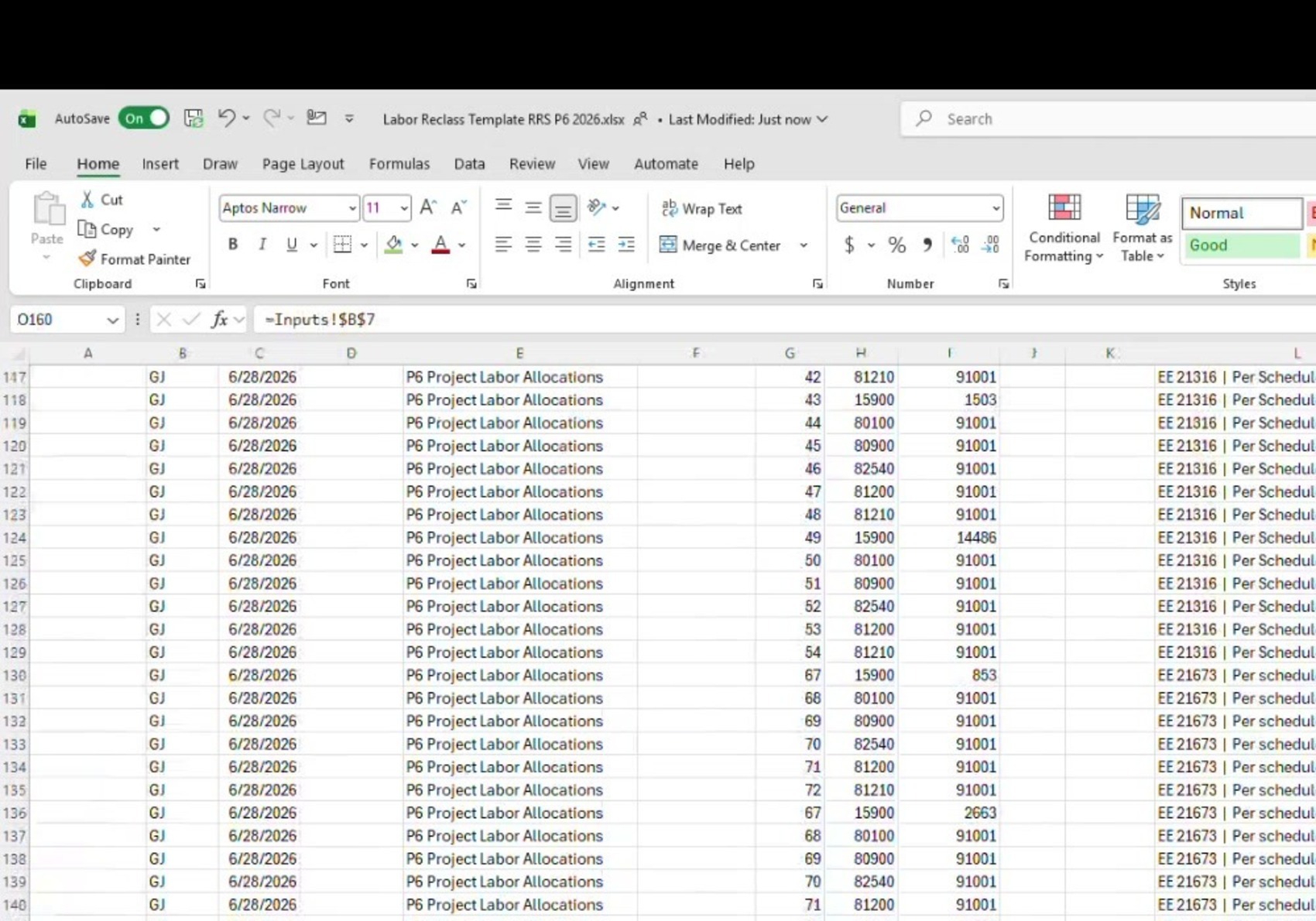
The import is fully formula-driven off those inputs — e.g. cell O160 on the import tab pulls directly from =Inputs!$B$7. You generally should not need to type over the import tab directly.
There is a dedicated check tab in the workbook. Pivot the data there and review it before posting, with the source file open on a second screen for comparison — the whole workbook is formula-based off that source file.
What this reclass actually looks like
| Detail | Value |
|---|---|
| GL accounts seen in P6 2026 | 81210, 15900, 80100, 80900, 82540, 81200 |
| Debit-side location | Mostly a corporate/project location code — 91001 in that period |
| Memo format | `EE [employee ID] |
Each memo line ties back to a specific employee ID from the client's source file. If a memo doesn't have a recognizable employee ID, treat that as a flag to double back to the source file rather than posting it as-is.
The format-drift watch-out
The file's format must stay consistent between periods for the formulas to work.
In the period covered by the review, the client removed some lines from their file before sending it, which caused the paste to fall out of alignment with the prior format.
Always compare the incoming file's row/column layout to the prior period's before pasting, and paste it into the same relative position. Do not paste over the old data without checking alignment first.
Capitalized labor and cross-concept splits
For restaurants being remodeled, or new openings where labor cost is meant to be capitalized rather than expensed, use the source-entity field on the far right of the import template. This allows one entry to correctly split the labor cost's ultimate destination when a cost impacts more than one concept/entity.
Secondary source. The client also sends a comparable store-level labor report at the end of the period covering activated (open) stores only — useful as a secondary cross-check.
Ownership. This entry was transitioning to Maureen at the time of the review, having previously been handled personally by Jeff. Confirm current ownership before assuming who is booking it.
The full workbook mechanics — sheet structure, the journal entry pattern, adding and removing employees, verification checks, and troubleshooting — are on Labor reclass import.
Bonus accrual
What the client sends
Mike typically sends two files each cycle — one for the restaurant entity, one for RCY.
File structure: the top of the file is a summary by quarter; below that, each period is broken out individually with the bonus type, the current accrued balance, the actual amount, what the balance should be, and the resulting adjustment.
How it's booked
In Sage Intacct, go into the prior month's bonus entry and duplicate it.
To match the new period's descriptions from the client's file. The memo/description column in the client file maps directly to what goes in the JE memo.
Main complexity
Each bonus adjustment line may apply at either the G&A level or the store level. Make sure each adjustment lands in the correct account and level rather than assuming they're all one or the other.
If a question comes up about which account a specific bonus type should hit, go directly to Mike rather than guessing — there's no need to spend significant time trying to reverse-engineer it.
Cadence is in transition
The client's stated long-term goal is to move this update from monthly to quarterly. As of the review, RCY had already skipped being updated for a period or two, while the restaurant side was still being updated monthly.
Confirm current cadence before assuming a period's bonus file is expected — it may not be, depending on where the client group has landed on frequency. Separately, no RRS bonus adjustment has been recorded since Period 2 this year. See Open items.
Ownership. Maureen had been trained on this entry and the following close was to be her first time handling it solo. Confirm who currently owns it.
Related
- Labor reclass import — the full workbook reference
- AP aging and payroll review — the bonus accrual checklist
- RRS payroll and accruals workpapers — the 21800 preparer steps
- RCY payroll and maintenance workpapers — the RCY side of the same import