
Credit Card and Cash Deposit Verification
The weekly reconciliation matching credit card deposits from the POS against deposits received at the bank, including variance thresholds and escalation.
| Field | Value |
|---|---|
| Owner | Unassigned — needs an owner |
| Department | General Accounting |
| Effective date | Not set in source |
| Scope | The weekly verification that credit card deposits reported in a client's point of sale were deposited at the client's bank. Also covers optional cash verification. Does not cover investigating or disputing variances with the card merchant, which is the client's responsibility. |
| Source | General Accounting/02 - Cash and Credit Card/Credit Card Deposit Reconciliation.docx |
For all clients that accept credit cards, Profit Builders provides a weekly credit card deposit reconciliation as part of its core services. The reconciliation matches credit card deposits processed through the point of sale against deposits received at the bank, and significant variances are reported to the client.
Profit Builders can be liable for unreported missing credit card deposits. Clients have a limited window to dispute missing deposits, and that window varies by card merchant. Timeliness and consistency are not optional here.
Cash verification is a separate service
Clients may also request weekly cash verification. This is an additional service outside the scope of core services. If a client expresses interest in adding cash reconciliation, contact John Ross.
The process is the same as credit card verification, except the POS payment type is cash.
Procedure
Credit card reconciliations must be done weekly, unless the client services agreement states otherwise.
The week is usually congruent with the period-close schedule. A Freddy's week starts on a Thursday and ends on a Wednesday, so the credit card reconciliation follows that same weekly schedule.
Any delay or postponement of a regularly scheduled reconciliation must be discussed with and approved by the accounting manager.
Always start with the POS. Generate a report detailing, by day, the amount collected by credit card payment.
Some businesses also use an online ordering platform that may carry a separate payment type in the POS. Generate all payment types relating to credit card transactions, not just the primary one.
System-specific instructions for pulling this report:
Using the POS report, create a reconciliation report and save it in the client's SharePoint under the current year and credit card verification folder.
The report must contain:
| Column | Source |
|---|---|
| POS Date | Point of sale report |
| POS Amount | Point of sale report |
| Bank Date | Bank activity |
| Bank Amount | Bank activity |
| Variance | Calculated |
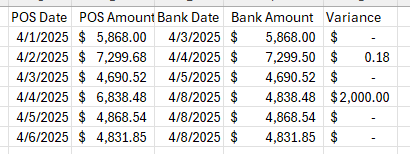
Add the bank amount with deposit date to the verification report. This calculates the variance column.
Escalation depends on what you found:
| Finding | Action |
|---|---|
| Missing deposits | Communicate to the client and the accounting manager immediately, without exception. |
| Variance over $150 | Communicate to the accounting manager. |
| Variance inconsistent with the client's typical pattern | Communicate to the accounting manager, regardless of size. |
If you are unsure what an acceptable variance is for a specific client, contact the accounting manager. Acceptable variance is client-specific.
Expected outcome: a completed verification report saved in the client's SharePoint, with every missing deposit and material variance communicated the same day it is identified.
Responsibility split
| Profit Builders | Client |
|---|---|
| Complete a weekly verification that all credit card payments reported in the POS were deposited in the client's bank account | Communicate any known power or internet outages that would affect batching of credit card payments or payment reporting in the POS |
| Notify the client immediately of any missing deposits | Work with internal staff (manager, IT), the POS provider, or the card merchant to determine the cause and recover missing deposits and variances |
| Notify the client timely of any daily variances over $150 |
POS instructions by system
The source document lists an appendix of per-POS instructions. Only two of those documents exist in the library today:
| POS | Status |
|---|---|
| CTUIT | Documented |
| Touchpoint | Documented |
| Par Brink | Referenced in the source appendix, but no document exists |
| Xenial | Referenced in the source appendix, but no document exists |
| Toast | Referenced in the source appendix, but no document exists |
| R365 | Referenced in the source appendix, but no document exists |
The source document also has an empty Period-End Reconciliation heading with no content beneath it. Both this and the four missing POS guides are open gaps.
Related documents
- Sales journal entry — payments are recorded to in-transit accounts, which is what makes this verification possible
- Export tender data from CTUIT
- Pull sales data from Touchpoint
- PBI vs. client responsibilities
CC DIT R365 Template.xlsx— see Supporting materials