
Project Accounting and Job Costing
How job costs and revenue flow through WIP and deferred revenue, and how to close out jobs at period end so revenue and expenses land in the same month.
| Field | Value |
|---|---|
| Owner | Unassigned — needs an owner |
| Department | General Accounting |
| Effective date | Not set in source |
| Scope | Project (job) accounting in Sage Intacct — how costs and revenue accumulate on the balance sheet during a job, and the period-end close-out that moves them to the income statement. Each client has specific reports and processes for the close-out entries; the concepts here are common to all. |
| Source | General Accounting/09 - Project Accounting/Project Accounting.docx |
Project accounting tracks financials for specific projects. It's used in construction, engineering, consulting, software development, and research — anywhere work is organized into distinct projects.
The key principle: post all revenue and expenses for each project to the income statement in the same month. Everything else in this procedure exists to serve that goal.
Features of project accounting
| Feature | What it does |
|---|---|
| Project-specific tracking | Revenue, costs, labor, materials, and overheads are tracked per project rather than only company-wide. |
| Budgeting and forecasting | Each project has its own budget and timeline, monitored for whether it stays within budget and on schedule. |
| Time and expense tracking | Labor hours, contractor work, and billable expenses are assigned to the correct project. |
| Revenue recognition | Determines when and how to recognize revenue, especially for long-term contracts (for example, percent-complete method). |
| Reporting | Project P&L, budget vs. actual, and work-in-progress reports. |
Key terms
| Term | Meaning |
|---|---|
| Jobs / Projects | A temporary, unique initiative with a defined beginning and end, undertaken to create a specific product, service, or result — for example a builder constructing a residential home. |
| Open jobs | Currently active or ongoing. Costs are still being incurred and a final bill has not been sent. |
| Closed jobs | All work finished, all costs recorded, and the customer final billed. |
| Cost codes | Codes representing industry-specific segments that group totals under the project. A home builder would use framing, drywall, windows, flooring. |
| Work in process (WIP) | The balance sheet asset account where all costs for open jobs are posted — project costs started but not yet finished. |
| Loan draws | Money the client requested from a lender against an approved loan. As costs are incurred the lender increases the loan balance and deposits funds. Recorded as liabilities. |
| Deferred revenue | All money received for an open job — generally loan draws from a bank or earnest money from the customer. Recorded as liabilities. |
Reports
| Report | Purpose |
|---|---|
| WIP report | All open projects and the WIP amount for each. The total must tie to the GL balance. |
| Deferred revenue report | All open projects and the deferred revenue for each. The total must tie to the GL balance. |
| Budget vs. actual | Project budget, costs incurred to date, and the variance. |
| Job cost report | Job costs summarized by cost code. |
| Job draws report | Job draws and WIP per project, calculating whether the job is over- or under-drawn. For some clients current month expenses are broken into a separate column. Used to determine the amount a client needs to request from a lender to pay expenses. |
| Job detail report | A GL detail report for the job, often grouped by cost code. |
How costs and revenue accumulate
The general rule: all job costs post to WIP, and all job revenue posts to deferred revenue. The WIP and deferred revenue reports are reviewed at period end to determine what moves to the income statement.
Job costs through AP
Job tracking starts as invoices are submitted through the weekly AP batch.
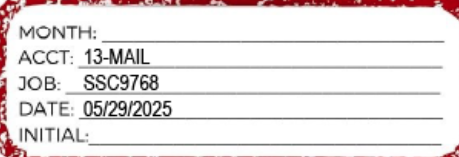
Clients are responsible for noting the job (for example SSC9768) and cost code (for example 13-MAIL) on each invoice. Manual checks and ACH payments are recorded the same way. Without the job and cost code, the cost cannot be assigned.
All job costs are posted as debits to WIP by the AP processor.
Job costs through the credit card import
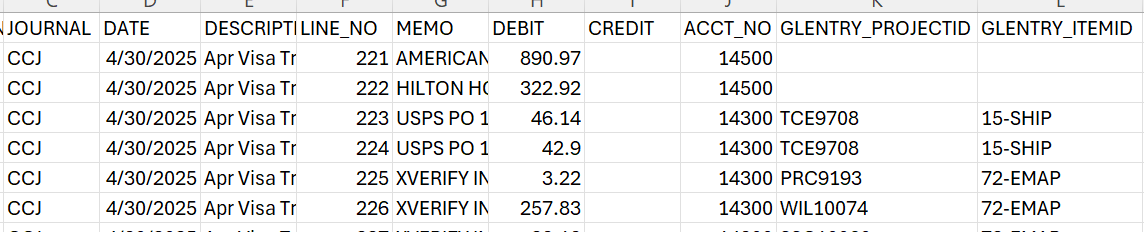
Some job costs come through the credit card import. The client should designate any job-related costs by providing the job and cost code. These post as a debit to WIP.
Deposits
Deposits recorded from the bank rec are entered as liabilities:
- Loans → credited to loan draw liabilities
- Payments from customers → credited to liability accounts such as earnest money, deferred revenue, or job draws
Period-end close-out
Close out jobs as the last step of the period close. All AP must be entered, the credit card reconciled, the bank recs completed, and loans tied out first — otherwise close-out entries are made against incomplete cost and revenue data.
As part of period end, the client provides a list of jobs closed during the month.
Before making any close-out entry, confirm:
- All AP is entered
- The credit card is reconciled
- The bank reconciliations are complete
- Loans are tied out
Run a report out of Intacct for the closed jobs giving the total of all costs for each job. Then make the entry:
Dr. Cost of Sales (P&L)
Cr. WIP (B/S)
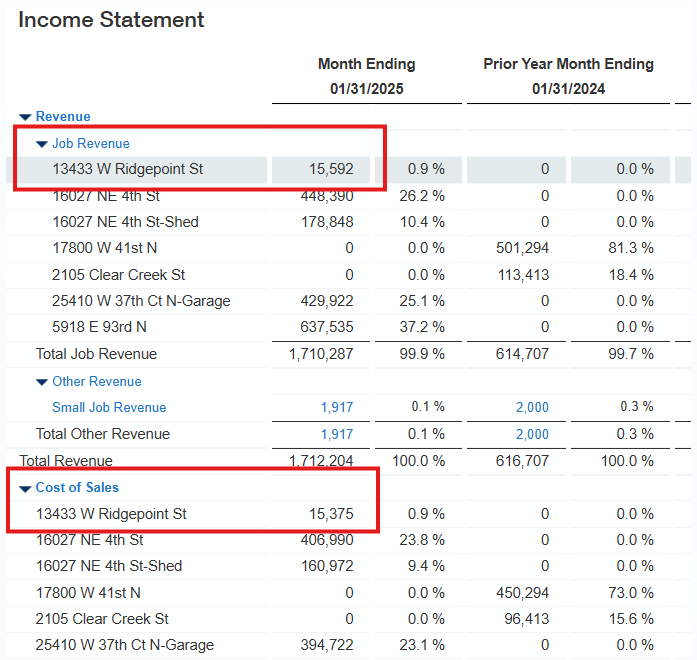
Run a report out of Intacct for the closed jobs giving the total revenue for each job. Then make the entry:
Dr. Deferred Revenue / Loan Draws / Earnest Money (B/S)
Cr. Job Revenue (P&L)
Each client has specific reports and processes for these entries, but the concept is identical across clients.
Change the project status from open to closed.
Go to Accounts Receivable → Set-Up → Projects. Find the project in the list and click edit. Enter the month-end date for the month the project was closed, and change Project Status to closed.
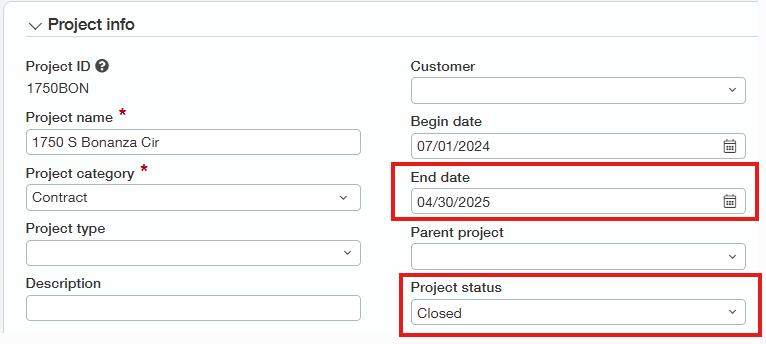
These two fields affect several reports in Intacct and are what allow filtering and searching historical information later. Setting the status without the date, or vice versa, breaks that.
Run the WIP report for open jobs and tie it out to the GL balance.
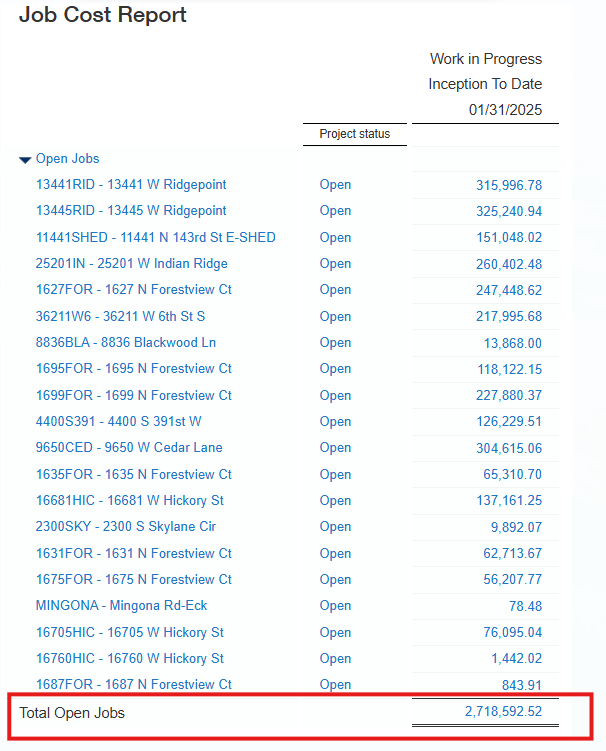
If WIP doesn't tie, the most common cause is expenses for jobs closed in prior periods being coded to WIP. Run the WIP report for all jobs to identify where the issue is. Any costs for closed jobs sitting in WIP must be reclassified to a cost of sales account on the income statement.
Follow the same process for deferred revenue. Run the summarized report for each GL — deferred revenue, loan draws, and so on — and tie each to its GL balance. Review variances, and most likely reclassify them to the income statement.
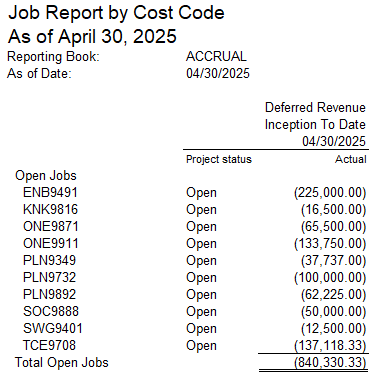
Expected outcome: WIP and deferred revenue reports for open jobs both tie to their GL balances, and all closed-job costs and revenue sit on the income statement in the month the job closed.
Summary of entries
| Transaction | Debit | Credit |
|---|---|---|
| Posting AP invoices | WIP (B/S) | Accounts Payable (B/S) |
| Posting credit card transactions | WIP (B/S) | Credit Card Payable (B/S) |
| Manual checks | WIP (B/S) | Bank Account (B/S) |
| Deposits from loans | Bank Account (B/S) | Loan Draws Payable (B/S) |
| Deposits from customers | Bank Account (B/S) | Deferred Revenue or Earnest Money (B/S) |
| Close-out WIP | Cost of Sales (P&L) | WIP (B/S) |
| Close-out deferred revenue | Deferred Revenue or Earnest Money (B/S) | Job Revenue (P&L) |
Related documents
- Financial analysis — the balance sheet verification that WIP and deferred revenue are supported
- Intacct bank reconciliation — where loan draws and customer deposits are recorded
- Day-to-day AP transactions in Sage Intacct — entering job-coded invoices