
Accounting for Third-Party Delivery Services
How delivery service sales, fees, and deposits flow through the GL, and how to reconcile the delivery in transit balance at period end.
| Field | Value |
|---|---|
| Owner | Unassigned — needs an owner |
| Department | General Accounting |
| Effective date | Not set in source |
| Scope | Recording and reconciling third-party delivery service activity — sales, sales tax, deposits, fees, commissions, error charges — and the period-end delivery in transit (DIT) reconciliation. Does not cover configuring the POS or delivery platform, which is the client's responsibility. |
| Source | General Accounting/03 - Delivery in Transit/Delivery in Transit Concepts.docx |
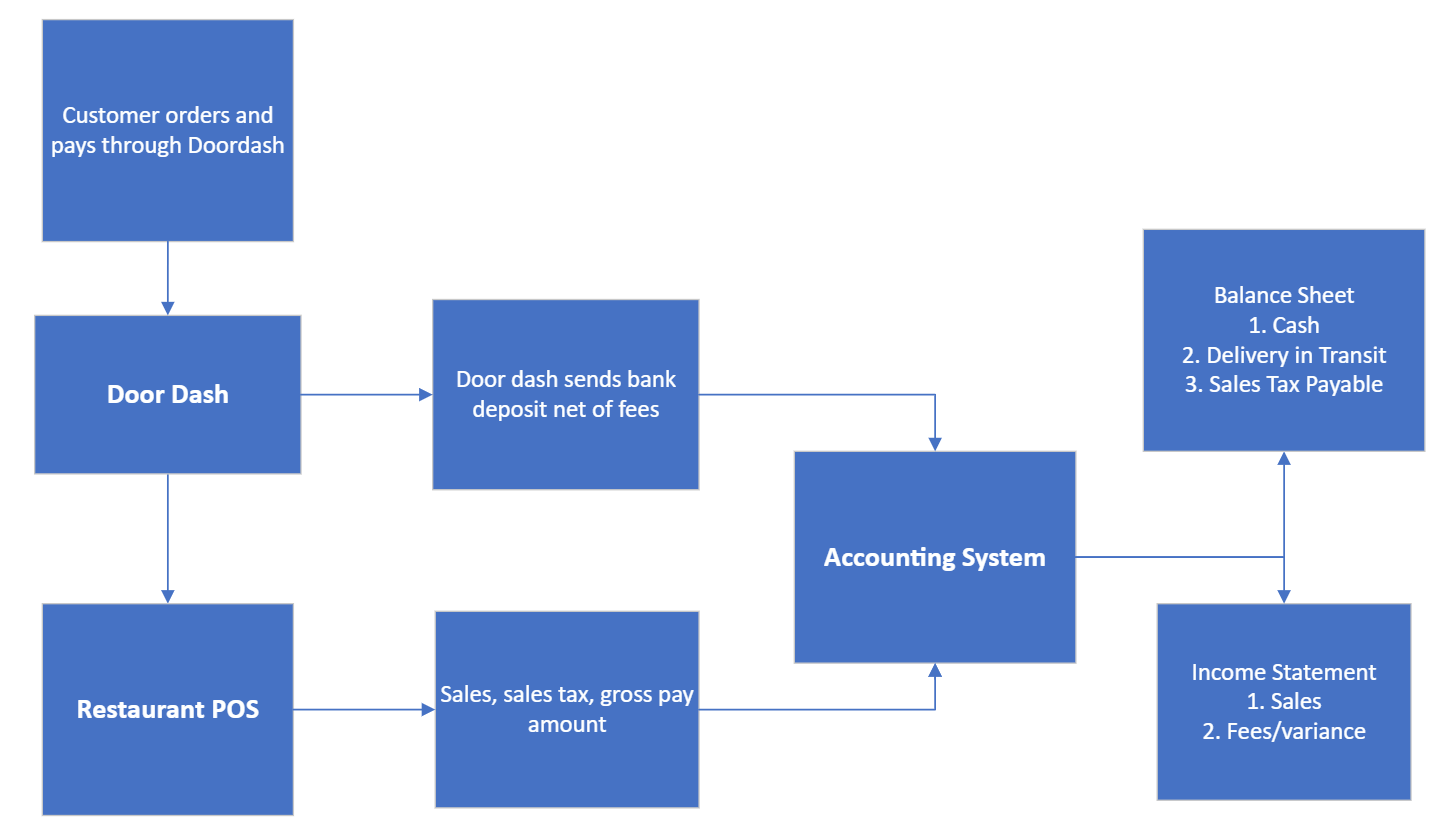
A delivery service provider — also called a third-party marketplace facilitator — is an independent company that delivers goods purchased from a retailer to a customer. Customers order through the provider's platform, the order routes to the store, is prepared, and a delivery driver picks it up. The typical providers are DoorDash, Uber Eats/Postmates, and Grubhub.
What appears in the general ledger
In general the GL shows three things: sales from the POS, deposits from the bank, and an entry to record fees and commissions.
Sales
When an order is placed on a delivery service website, it routes to the restaurant's point of sale carrying the gross sale, any discounts, any mark-ups, possibly sales tax, and a "payment." It usually does not calculate the fee the provider will charge.
It is very common for an item's sales price to be higher on a delivery service website than in the store.
Dr. Delivery Services In Transit (DIT)
Cr. Sales
Bank deposits
Deposits from the provider are usually the amount of sales less any commissions, fees, or error charges — and less sales tax if the provider is the remitter.
Not all delivery services deposit on the same schedule. Some are daily, weekly, or even monthly. Access payment reports on the provider's website to determine which sales days a deposit covers.
Dr. Cash
Cr. DIT
Fees and commissions
Each delivery service charges a fee, named differently by each provider. An entry records this expense and reduces the amount expected from deposits.
Dr. Delivery Services Expense
Cr. DIT
Error charges and adjustments
Error charges occur when the provider's customer has an issue or requests a refund — food not received, quality issues, complaints. Sometimes a technical issue between the provider and the store causes them.
These charges don't go back to the client's POS, so an entry has to be made to record the expense.
Dr. Delivery Services Expense
Cr. DIT
Sales tax on third-party delivery
Sales tax for third-party delivery varies by state and by client. State law determines who remits — the third-party provider or the operator providing the goods. Check with the individual state's department of revenue for clarification.
Don't assume who is remitting the tax, or that the tax is calculating correctly. Always check the transaction reports provided by the third-party service provider. If they remit tax, you should see tax being calculated and the provider withholding that tax from the client deposit.
Two checks are required:
- Provider reports — confirm tax is calculated and withheld from the deposit if the provider remits. Save the transaction reports showing the sales tax remitted in the client folder — this is critical in the event of an audit.
- Client POS reports — the client should have delivery orders set up as non-taxable, but this is not always the case.
If the client's orders are calculating sales tax but the provider is remitting it, you must:
- Make an entry moving that calculated tax out of accrued sales tax and reducing the delivery receivable.
- Reduce these sales from the sales tax filing.
Period-end reconciliation
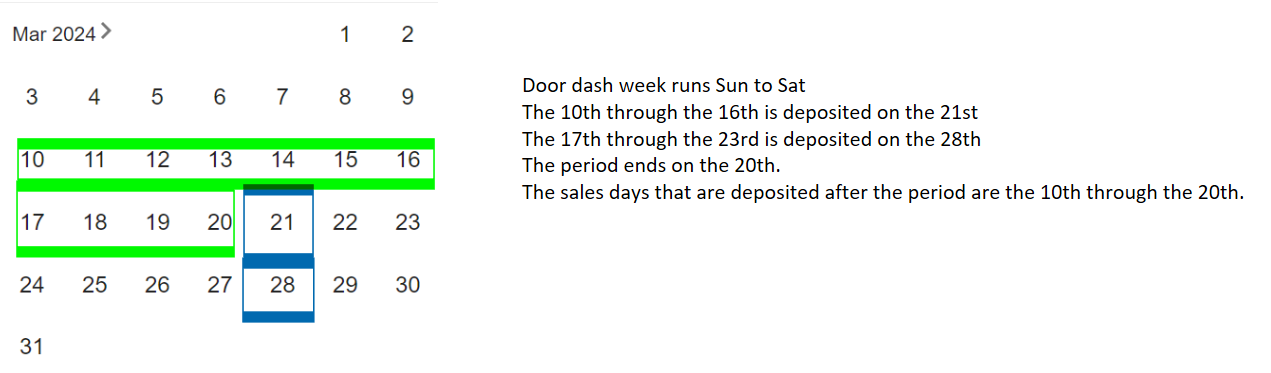
At the end of each period, record all entries, then reconcile the amount the client expects to receive from the provider after the period. This is typically orders placed before period end but paid after period end.
Documents you need
- General ledger detail for the period for the delivery receivable account
- A transaction report from the provider showing order detail for the period dates
- A payout report from the provider showing deposits and their dates for all orders during the period — this must include deposit dates after the period
Steps
Record all commissions, fees, and error charges from the transaction report for the period.
Dr. Delivery Services Expense
Cr. DIT (receivable)
If applicable, record any sales tax that was incorrectly calculated in the POS but remitted by the provider, based on the POS numbers.
Dr. Sales Tax
Cr. DIT (receivable)
The balance in the balance sheet account should equal the expected deposit for delivery sales that occurred during the current period but were deposited after the period close date.
Worked example: the provider deposits each Thursday for sales from Saturday to Sunday. The client's period ends on a Sunday. The receivable at period end should be the sales orders for the last week of the period, Saturday through Sunday.
Compare the expected deposit in transit against the GL balance. Expect some variance.
- Discuss with the accounting manager what an acceptable variance is for that client.
- Expense the variance and identify it as a variance.
Do not combine the variance with fees and commissions. Keeping it separate is what lets business owners see unexpected variances and decide whether to take action with the delivery provider.
Expected outcome: the DIT balance ties to the expected post-period deposit, with any residual expensed and labelled as a variance.
Researching a variance above threshold
If the variance exceeds what the manager considers acceptable, work through these checks:
Especially important for new stores. Most providers remit on a regular basis — if they usually deposit each Monday, confirm a deposit arrived each Monday in the period for each store. Check the bank statement or reconciliation.
Confirm the transaction reports cover the correct days in the period, and that payment reports cover all the sales dates needed.
Check that sales tax is still calculating the way it typically did in the POS — it may have calculated last month but not this month. Also check whether the third-party provider has started remitting sales tax on the client's behalf.
Confirm the POS reports for delivery sales match the GL entry. This is especially important in R365, where something may have been mapped incorrectly in the daily sales summary (DSS).
Responsibility split
| Profit Builders | Client |
|---|---|
| Post all commissions, fees, error adjustments, and variances | Provide online access to all delivery systems with permissions to pull required reports |
| Reconcile the ending DIT balance reported on the balance sheet for each location | Configure all settings for new locations as they come online |
| Report significant variances to the client — it is not PBI's responsibility to identify the cause of each variance or dispute it with the provider | Maintain correct sales tax settings in both the POS and the delivery service software |
| Report missing deposits as soon as they are identified | Research and/or dispute any variances reported by PBI staff |
| Save all relevant POS and provider reports in SharePoint to support sales tax adjustments in the event of an audit |
Related documents
- Accrued sales tax — the adjustment when a provider remits tax the POS also calculated
- Sales journal entry — how delivery payments enter the books
- PBI vs. client responsibilities
- Provider-specific process workbooks for DoorDash, Uber, and Grubhub — see Supporting materials
The source document ends with an empty Appendix heading. The DoorDash and Uber process workbooks exist as spreadsheets in the library but have no written procedure, and the firm's own document list flags the DIT process docs as "Need to clean this up and update." Converting those workbooks into written procedures is an open gap.