---
title: "Record a Sales Journal Entry"
sidebarTitle: "Sales journal entry"
description: "How to build a sales entry from a point-of-sale report — sales and discounts, payments to in-transit accounts, liability components, and paid outs."
icon: "cash-register"
---
> **For AI agents:** the complete documentation index is at [llms.txt](/llms.txt). Append `.md` to any page URL for its markdown version.
| Field | Value |
|---|---|
| **Owner** | Unassigned — needs an owner |
| **Department** | General Accounting |
| **Effective date** | Not set in source |
| **Scope** | Building the sales journal entry from a point-of-sale report, including sales, discounts, payments, liability components, and paid outs. Explains the reasoning behind PBI's standard treatments. Does not cover configuring the POS or the delivery-service reconciliation — see [Delivery in transit](/internal/sops/accounting/general/delivery-in-transit). |
| **Source** | `General Accounting/01 - Sales/Sales Journal Entry.docx` |
A sales entry records the sale of goods or services to a customer and the payment for those services — by cash, credit (A/R), and third-party providers such as DoorDash or ezCater. The point-of-sale report is the starting document for the entry.
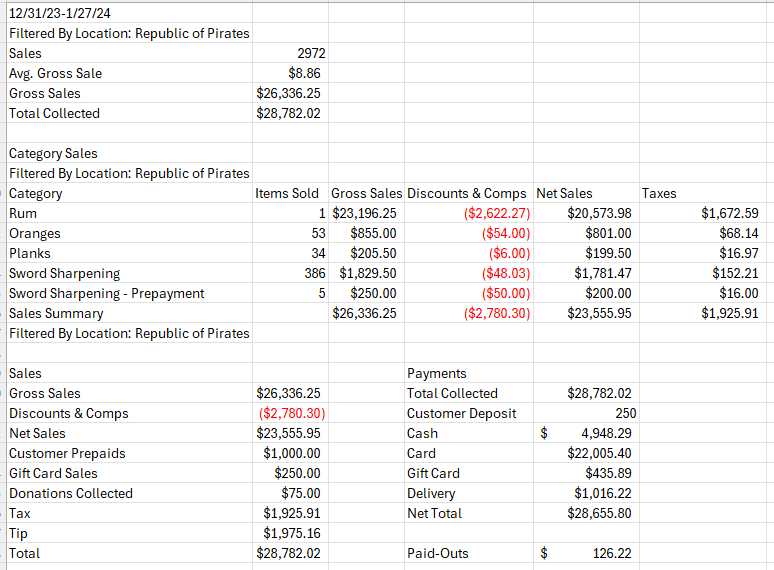 ## Sales and discounts
Sales can be recorded **gross** or **net**:
- **Gross** — the full amount of the sale before any discounts and without sales tax.
- **Net** — gross sales minus discounts.
These definitions apply to the income statement. Individual POS reports may define gross and net differently — **always verify what the amounts on the POS report actually represent**. CTUIT, for example, can be configured to include sales tax in the gross sale amount.
PBI's standard procedure is to record the gross sale as a **credit** and the discount as a **debit**, keeping them separate.
Recording gross sales and discounts separately enhances transparency, supports performance evaluation and financial analysis, and complies with accounting standards.
## Sales and discounts
Sales can be recorded **gross** or **net**:
- **Gross** — the full amount of the sale before any discounts and without sales tax.
- **Net** — gross sales minus discounts.
These definitions apply to the income statement. Individual POS reports may define gross and net differently — **always verify what the amounts on the POS report actually represent**. CTUIT, for example, can be configured to include sales tax in the gross sale amount.
PBI's standard procedure is to record the gross sale as a **credit** and the discount as a **debit**, keeping them separate.
Recording gross sales and discounts separately enhances transparency, supports performance evaluation and financial analysis, and complies with accounting standards.
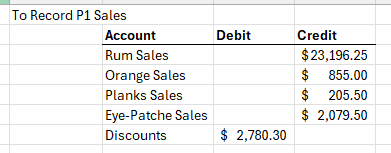 This portion of the entry creates the net sales section of the income statement.
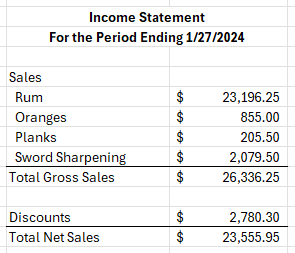 Some clients record only the net sale, either by choice or because of POS reporting limits. Discuss these specific situations with the accounting manager rather than deviating on your own.
## Payments
Businesses collect payments by cash, credit card, third-party delivery, and other methods.
**PBI's standard procedure is to record payments to in-transit accounts rather than directly to a bank account.** This makes it far easier to verify which deposits were still outstanding at the end of the period.
Deposits are recorded as **debits** to the various payment receivable accounts.
Some clients record only the net sale, either by choice or because of POS reporting limits. Discuss these specific situations with the accounting manager rather than deviating on your own.
## Payments
Businesses collect payments by cash, credit card, third-party delivery, and other methods.
**PBI's standard procedure is to record payments to in-transit accounts rather than directly to a bank account.** This makes it far easier to verify which deposits were still outstanding at the end of the period.
Deposits are recorded as **debits** to the various payment receivable accounts.
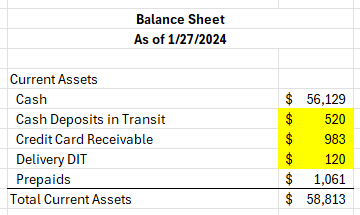
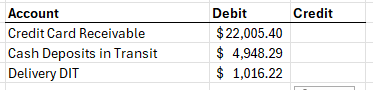 Any payment amounts that have not cleared the bank at period end appear as current assets on the balance sheet.
 ## Liability components
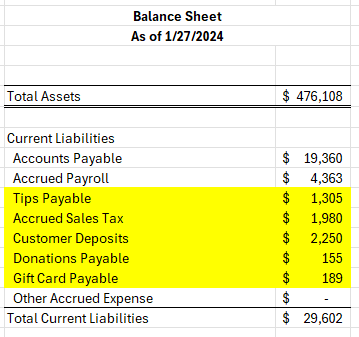
Several parts of the sales entry hit balance sheet liabilities rather than the income statement.
## Liability components
Several parts of the sales entry hit balance sheet liabilities rather than the income statement.
 ### Accrued sales tax
Sales tax is what a business collects from customers on behalf of a state or local government. It is **not part of the business's profits** and must not be included in the sales total. Record it as a **credit**, creating a liability until it is remitted.
### Accrued sales tax
Sales tax is what a business collects from customers on behalf of a state or local government. It is **not part of the business's profits** and must not be included in the sales total. Record it as a **credit**, creating a liability until it is remitted.
 For the full treatment, see [Accrued sales tax](/internal/sops/accounting/tax/accrued-sales-tax).
### Customer deposits
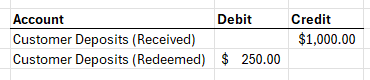
A customer deposit or prepayment for goods or services to be delivered later is recorded as a **credit to a liability account**. When the goods or services are delivered, the sale is recorded and the liability is removed.
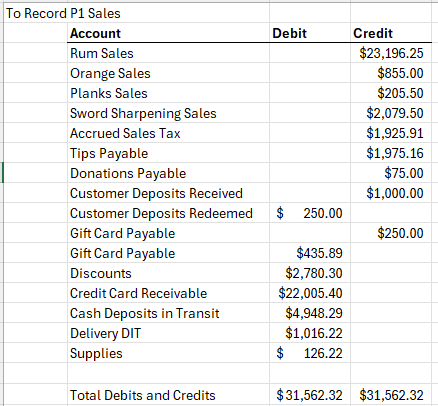
In the example, customers prepay for one year of monthly sword sharpening. The business recognizes 1/12 of the prepayment each month. The entry credits customer deposit liability for the $1,000 collected and debits the customer liability for the portion recognized in January.
For the full treatment, see [Accrued sales tax](/internal/sops/accounting/tax/accrued-sales-tax).
### Customer deposits
A customer deposit or prepayment for goods or services to be delivered later is recorded as a **credit to a liability account**. When the goods or services are delivered, the sale is recorded and the liability is removed.
In the example, customers prepay for one year of monthly sword sharpening. The business recognizes 1/12 of the prepayment each month. The entry credits customer deposit liability for the $1,000 collected and debits the customer liability for the portion recognized in January.
 ### Tips and gratuity payable
Tips are a pass-through. Customers add the tip to their purchase, the POS records it, and the business pays it to employees in cash or through payroll. Record tips as a **credit** to increase the liability.
### Tips and gratuity payable
Tips are a pass-through. Customers add the tip to their purchase, the POS records it, and the business pays it to employees in cash or through payroll. Record tips as a **credit** to increase the liability.
 ### Gift cards
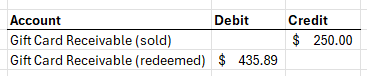
Selling a gift card creates a **liability**, not a sale. As customers use gift cards for payment, a sale is recorded and the liability is reduced.
Whether the gift card balance is a liability or a receivable depends on who owns the gift card liability:
- **Large franchising groups** (for example, Freddy's) — the franchisee owns the gift card liability. A card bought at one location can be used at any location nationally, and individual franchisees pay or receive the net amount of gift card transactions for a set period, weekly in this case.
- **Businesses with one to a few locations** — the entire liability for all gift cards sold sits on their balance sheet.
In the example, the business sold $250 in gift cards and had customers redeem $435.89.
### Gift cards
Selling a gift card creates a **liability**, not a sale. As customers use gift cards for payment, a sale is recorded and the liability is reduced.
Whether the gift card balance is a liability or a receivable depends on who owns the gift card liability:
- **Large franchising groups** (for example, Freddy's) — the franchisee owns the gift card liability. A card bought at one location can be used at any location nationally, and individual franchisees pay or receive the net amount of gift card transactions for a set period, weekly in this case.
- **Businesses with one to a few locations** — the entire liability for all gift cards sold sits on their balance sheet.
In the example, the business sold $250 in gift cards and had customers redeem $435.89.
 ### Donations payable
Round-up-for-charity donations are captured in the POS and recorded in the sales journal. The accounting is similar to sales tax — a pass-through that is collected and then remitted. Record the donation as a **credit** to a donations payable liability.
### Donations payable
Round-up-for-charity donations are captured in the POS and recorded in the sales journal. The accounting is similar to sales tax — a pass-through that is collected and then remitted. Record the donation as a **credit** to a donations payable liability.
 ## Paid outs
A paid out is an expense paid directly from the cash register or petty cash fund. Common situations:
| Type | Examples |
|---|---|
| **Petty cash expenses** | Office supplies, minor repairs, employee reimbursements |
| **Employee tips or floats** | Cash payments to employees for tips or advances |
| **Refunds or exchanges** | Cash refunds for returned merchandise or cancelled orders |
In the example, a manager used cash to buy hand soap, paper towels, and copy paper from a local grocery store — all coded to supplies, debiting supplies.
## Paid outs
A paid out is an expense paid directly from the cash register or petty cash fund. Common situations:
| Type | Examples |
|---|---|
| **Petty cash expenses** | Office supplies, minor repairs, employee reimbursements |
| **Employee tips or floats** | Cash payments to employees for tips or advances |
| **Refunds or exchanges** | Cash refunds for returned merchandise or cancelled orders |
In the example, a manager used cash to buy hand soap, paper towels, and copy paper from a local grocery store — all coded to supplies, debiting supplies.
 Strongly encourage clients to review and retain all paid out receipts and to verify cash on hand regularly. Paid outs are cash leaving the business with no invoice behind them.
## Completed entry
Strongly encourage clients to review and retain all paid out receipts and to verify cash on hand regularly. Paid outs are cash leaving the business with no invoice behind them.
## Completed entry
 ## Related documents
- [Accrued sales tax](/internal/sops/accounting/tax/accrued-sales-tax) — the full sales tax liability and filing process
- [Delivery in transit](/internal/sops/accounting/general/delivery-in-transit) — third-party delivery sales and the DIT receivable
- [Credit card and cash deposit verification](/internal/sops/accounting/general/credit-card-deposit-verification) — verifying the payments recorded here actually reached the bank
- `Sales Entry Example.xlsx` — see [Supporting materials](/internal/sops/accounting/supporting-materials)
## Related documents
- [Accrued sales tax](/internal/sops/accounting/tax/accrued-sales-tax) — the full sales tax liability and filing process
- [Delivery in transit](/internal/sops/accounting/general/delivery-in-transit) — third-party delivery sales and the DIT receivable
- [Credit card and cash deposit verification](/internal/sops/accounting/general/credit-card-deposit-verification) — verifying the payments recorded here actually reached the bank
- `Sales Entry Example.xlsx` — see [Supporting materials](/internal/sops/accounting/supporting-materials)