---
title: "Bank Reconciliation Concepts"
sidebarTitle: "Bank rec concepts"
description: "What a bank reconciliation is, why it matters, the key terms, and the standard steps — the foundation for the system-specific reconciliation procedures."
icon: "book-open"
---
> **For AI agents:** the complete documentation index is at [llms.txt](/llms.txt). Append `.md` to any page URL for its markdown version.
| Field | Value |
|---|---|
| **Owner** | Unassigned — needs an owner |
| **Department** | General Accounting |
| **Effective date** | Not set in source |
| **Scope** | The concepts, terminology, and standard steps common to every bank reconciliation, regardless of accounting system. Read this before the system-specific procedures for Intacct and R365. |
| **Source** | `General Accounting/02 - Bank Reconciliation/Bank Reconciliation Concepts.docx` |
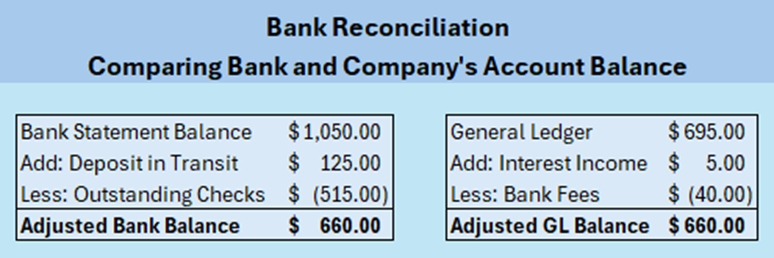
A bank reconciliation compares a business's own accounting records against the bank's records to confirm they match. If something is in the company's books but not on the bank statement, it gets reviewed and adjusted. If something is on the bank statement but not in the books, it gets added.
**Bank reconciliations must be completed no later than one week following the period close date.**
 ## Why it matters
A reconciliation is not a clerical exercise — it is the primary control over the client's cash.
- **Accurate financial records** — confirms all cash activity has been recorded properly.
- **Accurate balance sheet** — verifies the general ledger cash balance is correct.
- **Error detection** — catches duplicate entries and unrecorded transactions in either the books or the statement.
- **Internal control** — uncovers unauthorized transactions and fraudulent activity.
- **Cash flow management** — gives the client accurate reporting and visibility into outstanding items.
## Key terms
| Term | Meaning |
|---|---|
| **Cleared transactions** | Transactions that have cleared the bank and appear on the bank statement. |
| **Uncleared / outstanding transactions** | Transactions recorded in the accounting system but not yet on the bank statement. |
| **General ledger cash balance** | The total of all cash transactions recorded for a bank account, whether cleared or still outstanding. |
| **Bank statement balance** | The balance the bank reports for the account. |
| **Reconciling items** | Differences between the company's records and the bank's statement. |
Reconciling items typically include:
- **Outstanding checks** — checks written but not yet cashed
- **Deposits in transit** — deposits recorded by the company but not yet recorded by the bank
- **Bank fees, interest earned, or other charges** not yet recorded in the books
## Standard steps
Download the bank statement and the bank activity for the accounting period, and save both in the period-close folder. Name files with the client name, bank name, month, and year.
Filing differs by client calendar:
| Client type | Bank statement | Bank transaction file |
|---|---|---|
| **Fiscal year** | Bank statements folder | Period-close folder (file aligned to the period-end date) |
| **Calendar year** | Period-close folder | Period-close folder |
Confirm the previous period's ending balance matches the current period's opening balance.
If the opening balances don't agree, stop and resolve that before going further. Everything downstream depends on it.
Verify that all deposits recorded in the books appear on the bank statement. Record any deposits on the statement that are not in the general ledger.
Confirm all payments, checks, and withdrawals align with the bank records. Research and record any payments not in the general ledger.
If you are recording a significant number of payments at the time of reconciliation, contact the accounting manager. Payments should be entered by the accounts payable team **weekly** — a backlog surfacing at reconciliation is a process problem, not a reconciliation task.
Record any bank charges, interest earned, or automatic transactions missing from the general ledger.
Every outstanding item needs a reason, and some have age limits:
| Item | Rule |
|---|---|
| **Outstanding AP checks** | Checks more than **3 months old** go to the AP processor for research. |
| **Outstanding payroll checks** | Checks older than **6 months** move to the unclaimed payroll liability GL. |
| **Deposits in transit** | Verify outstanding deposits posted at the bank after period end. Deposits that have **not** posted after period end must be communicated to the client at the time of reconciliation. |
| **Outstanding ACH payments** | There should be none — all ACH payments post with the bank posting date. Research any against post-reconciliation bank activity, or review for a duplicate entry. |
Confirm the reconciled bank balance matches the general ledger balance. Save the reconciliation in the period close workbook, and save any downloaded bank activity or statements in the period close folder (bank statements go to the bank statements folder for fiscal year clients).
**Expected outcome:** the amount to reconcile is zero, every outstanding item has a known reason, and the reconciliation is filed in the period close workbook.
## Next: the system-specific procedure
Reconciling in Sage Intacct, including the auto-match import and how to enter each transaction type.
The two-part process in Restaurant365 — bank activity, then the reconciliation screen.
## Related documents
- [PBI vs. client responsibilities](/internal/sops/accounting/responsibilities) — what the client must provide for a reconciliation to be possible
- [Bank transaction automation — rule setup](/internal/sops/accounting/general/bank-automation-setup) — automating creation and matching in Intacct
- `Bank Recon Balance Sheet Support.xlsx` — see [Supporting materials](/internal/sops/accounting/supporting-materials)
## Why it matters
A reconciliation is not a clerical exercise — it is the primary control over the client's cash.
- **Accurate financial records** — confirms all cash activity has been recorded properly.
- **Accurate balance sheet** — verifies the general ledger cash balance is correct.
- **Error detection** — catches duplicate entries and unrecorded transactions in either the books or the statement.
- **Internal control** — uncovers unauthorized transactions and fraudulent activity.
- **Cash flow management** — gives the client accurate reporting and visibility into outstanding items.
## Key terms
| Term | Meaning |
|---|---|
| **Cleared transactions** | Transactions that have cleared the bank and appear on the bank statement. |
| **Uncleared / outstanding transactions** | Transactions recorded in the accounting system but not yet on the bank statement. |
| **General ledger cash balance** | The total of all cash transactions recorded for a bank account, whether cleared or still outstanding. |
| **Bank statement balance** | The balance the bank reports for the account. |
| **Reconciling items** | Differences between the company's records and the bank's statement. |
Reconciling items typically include:
- **Outstanding checks** — checks written but not yet cashed
- **Deposits in transit** — deposits recorded by the company but not yet recorded by the bank
- **Bank fees, interest earned, or other charges** not yet recorded in the books
## Standard steps
Download the bank statement and the bank activity for the accounting period, and save both in the period-close folder. Name files with the client name, bank name, month, and year.
Filing differs by client calendar:
| Client type | Bank statement | Bank transaction file |
|---|---|---|
| **Fiscal year** | Bank statements folder | Period-close folder (file aligned to the period-end date) |
| **Calendar year** | Period-close folder | Period-close folder |
Confirm the previous period's ending balance matches the current period's opening balance.
If the opening balances don't agree, stop and resolve that before going further. Everything downstream depends on it.
Verify that all deposits recorded in the books appear on the bank statement. Record any deposits on the statement that are not in the general ledger.
Confirm all payments, checks, and withdrawals align with the bank records. Research and record any payments not in the general ledger.
If you are recording a significant number of payments at the time of reconciliation, contact the accounting manager. Payments should be entered by the accounts payable team **weekly** — a backlog surfacing at reconciliation is a process problem, not a reconciliation task.
Record any bank charges, interest earned, or automatic transactions missing from the general ledger.
Every outstanding item needs a reason, and some have age limits:
| Item | Rule |
|---|---|
| **Outstanding AP checks** | Checks more than **3 months old** go to the AP processor for research. |
| **Outstanding payroll checks** | Checks older than **6 months** move to the unclaimed payroll liability GL. |
| **Deposits in transit** | Verify outstanding deposits posted at the bank after period end. Deposits that have **not** posted after period end must be communicated to the client at the time of reconciliation. |
| **Outstanding ACH payments** | There should be none — all ACH payments post with the bank posting date. Research any against post-reconciliation bank activity, or review for a duplicate entry. |
Confirm the reconciled bank balance matches the general ledger balance. Save the reconciliation in the period close workbook, and save any downloaded bank activity or statements in the period close folder (bank statements go to the bank statements folder for fiscal year clients).
**Expected outcome:** the amount to reconcile is zero, every outstanding item has a known reason, and the reconciliation is filed in the period close workbook.
## Next: the system-specific procedure
Reconciling in Sage Intacct, including the auto-match import and how to enter each transaction type.
The two-part process in Restaurant365 — bank activity, then the reconciliation screen.
## Related documents
- [PBI vs. client responsibilities](/internal/sops/accounting/responsibilities) — what the client must provide for a reconciliation to be possible
- [Bank transaction automation — rule setup](/internal/sops/accounting/general/bank-automation-setup) — automating creation and matching in Intacct
- `Bank Recon Balance Sheet Support.xlsx` — see [Supporting materials](/internal/sops/accounting/supporting-materials)