---
title: "Plate IQ ACH Enrollment"
sidebarTitle: "Plate IQ ACH setup"
description: "Complete the Plate IQ ACH enrollment form for a client bank account, including the controller, business, bank account, and business owner sections."
icon: "building-columns"
---
> **For AI agents:** the complete documentation index is at [llms.txt](/llms.txt). Append `.md` to any page URL for its markdown version.
| Field | Value |
|---|---|
| **Owner** | Unassigned — needs an owner |
| **Department** | Accounts Payable |
| **Effective date** | Not set in source |
| **Scope** | Completing the Plate IQ ACH enrollment form so a client bank account can fund ACH payments through Plate IQ's payment partner. Covers what each section of the form requires. Does not cover paying individual invoices in Plate IQ. |
| **Source** | `Accounts Payable Department/3. Payment Processing/Plate IQ ACH Set-up.docx` |
The source document is a set of screenshots with no written instructions. The steps below were reconstructed from those screenshots. Have the section owner confirm the detail before this page moves out of Draft.
Plate IQ processes ACH through a payment partner (Dwolla), which means enrollment collects the identity and ownership information a financial institution requires. Expect to need the client's EIN, the controller's personal details, and ownership percentages before you start — gathering these mid-form causes an abandoned application.
This form collects Social Security numbers, dates of birth, and full bank account numbers. Do not capture screenshots of a completed form, and do not send any of these values over email or chat. One screenshot in the source document showed a completed controller section including an SSN and date of birth; it was excluded from this page for that reason.
## Before you start
Collect the following from the client:
- **Controller details** — full name, job title, date of birth, Social Security number, and home address for the person who controls the organization and signs checks. This is usually the bank account owner.
- **Business details** — legal business name, DBA, EIN, business type, state and date of incorporation, phone, and the business address **as reported to the IRS**. PO boxes and mail drops are not accepted.
- **Bank account details** — routing number, account number, and the starting check number.
- **Business owners** — name, date of birth, full SSN, and address for every individual owning **25% or more** of the company.
## Procedure
Enter the controller's first and last name, job title, date of birth, Social Security number, and home address.
A controller is any user who holds significant control over the organization and can sign checks — usually the bank account owner. If the controller has no Social Security number, select **I don't have a Social security number**.
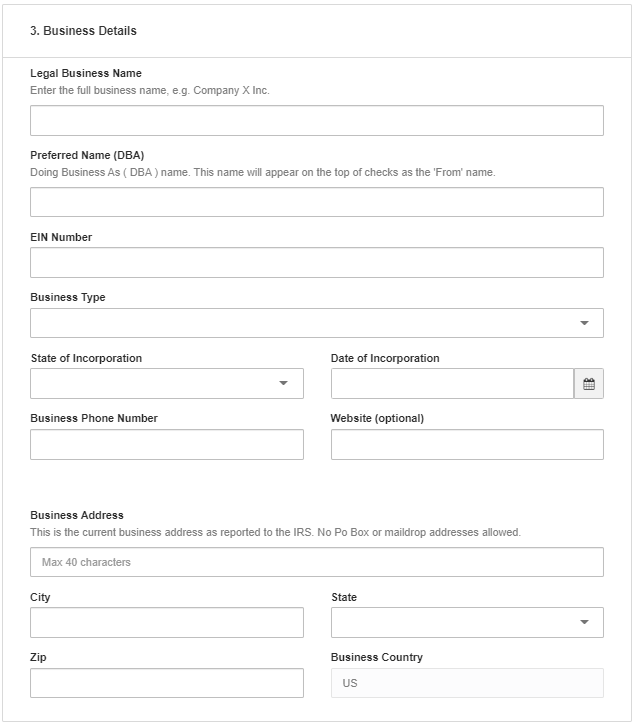 - **Legal Business Name** — the full business name, including the suffix (for example, `Company X Inc.`).
- **Preferred Name (DBA)** — appears at the top of checks as the "From" name.
- **EIN Number**, **Business Type**, **State** and **Date of Incorporation**.
- **Business Address** — must match the address on file with the IRS. Maximum 40 characters; no PO boxes or mail drops.
- **Legal Business Name** — the full business name, including the suffix (for example, `Company X Inc.`).
- **Preferred Name (DBA)** — appears at the top of checks as the "From" name.
- **EIN Number**, **Business Type**, **State** and **Date of Incorporation**.
- **Business Address** — must match the address on file with the IRS. Maximum 40 characters; no PO boxes or mail drops.
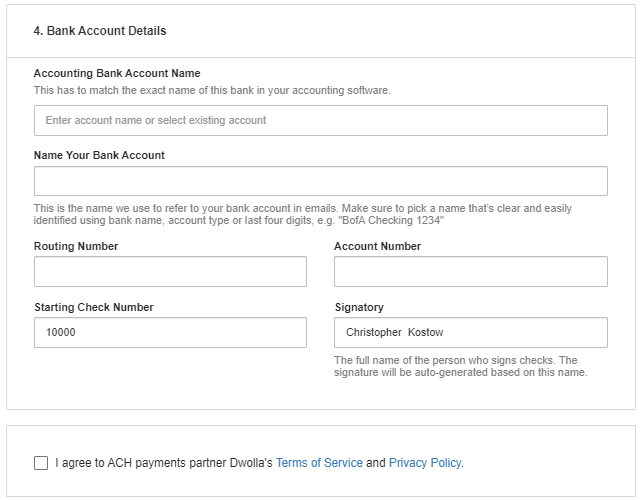 - **Accounting Bank Account Name** — must match the exact name of this bank account in the accounting software. Select the existing account rather than typing a new name where possible.
- **Name Your Bank Account** — the label used in Plate IQ emails. Use something identifiable, such as bank name plus account type plus the last four digits (`BofA Checking 1234`).
- **Routing Number** and **Account Number**.
- **Starting Check Number** — the next check number to issue from this account.
- **Signatory** — the full name of the person who signs checks. The signature is auto-generated from this name.
Confirm the starting check number against the client's existing check register before submitting. A starting number that overlaps checks already issued will produce duplicate check numbers, which breaks positive pay matching and bank reconciliation.
- **Accounting Bank Account Name** — must match the exact name of this bank account in the accounting software. Select the existing account rather than typing a new name where possible.
- **Name Your Bank Account** — the label used in Plate IQ emails. Use something identifiable, such as bank name plus account type plus the last four digits (`BofA Checking 1234`).
- **Routing Number** and **Account Number**.
- **Starting Check Number** — the next check number to issue from this account.
- **Signatory** — the full name of the person who signs checks. The signature is auto-generated from this name.
Confirm the starting check number against the client's existing check register before submitting. A starting number that overlaps checks already issued will produce duplicate check numbers, which breaks positive pay matching and bank reconciliation.
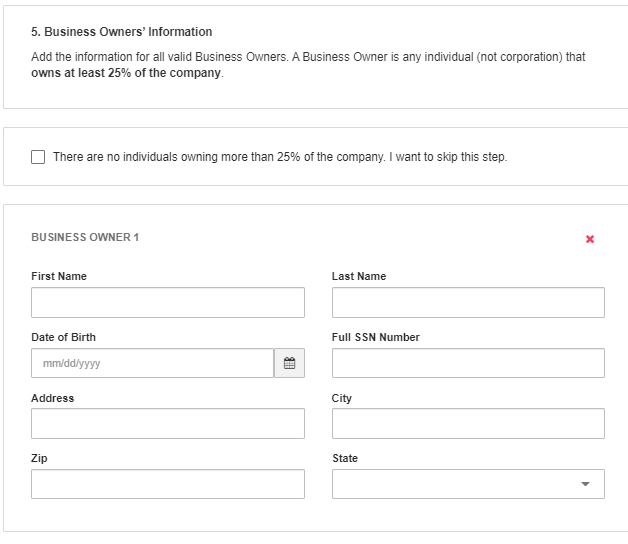 Add every individual — not corporation — who owns **at least 25%** of the company, entering name, date of birth, full SSN, address, city, ZIP, and state for each.
If no individual owns more than 25%, select **There are no individuals owning more than 25% of the company. I want to skip this step.**
Select the checkbox agreeing to the ACH payments partner's Terms of Service and Privacy Policy, then submit the form.
**Expected outcome:** the bank account enters verification with the payment partner. Do not schedule ACH payments from the account until verification completes.
## Related documents
- [Bank (NACHA) file payment processing policy](/internal/sops/accounting/ap/nacha-bank-file-policy) — the firm's controls for handling banking information
- [Enable ACH payments for a vendor](/internal/sops/accounting/ap/ach-vendor-setup) — the equivalent setup on the vendor side in Intacct
Add every individual — not corporation — who owns **at least 25%** of the company, entering name, date of birth, full SSN, address, city, ZIP, and state for each.
If no individual owns more than 25%, select **There are no individuals owning more than 25% of the company. I want to skip this step.**
Select the checkbox agreeing to the ACH payments partner's Terms of Service and Privacy Policy, then submit the form.
**Expected outcome:** the bank account enters verification with the payment partner. Do not schedule ACH payments from the account until verification completes.
## Related documents
- [Bank (NACHA) file payment processing policy](/internal/sops/accounting/ap/nacha-bank-file-policy) — the firm's controls for handling banking information
- [Enable ACH payments for a vendor](/internal/sops/accounting/ap/ach-vendor-setup) — the equivalent setup on the vendor side in Intacct