---
title: "Report distribution and scheduling"
sidebarTitle: "Report distribution"
description: "The AC Financials package naming convention, where scheduling lives, and the start-date trap that can trigger re-sends of historical periods."
icon: "paper-plane"
---
> **For AI agents:** the complete documentation index is at [llms.txt](/llms.txt). Append `.md` to any page URL for its markdown version.
**Source:** `Rackson_RRS_RCY_Review_Process.docx` section 49.
## Naming convention
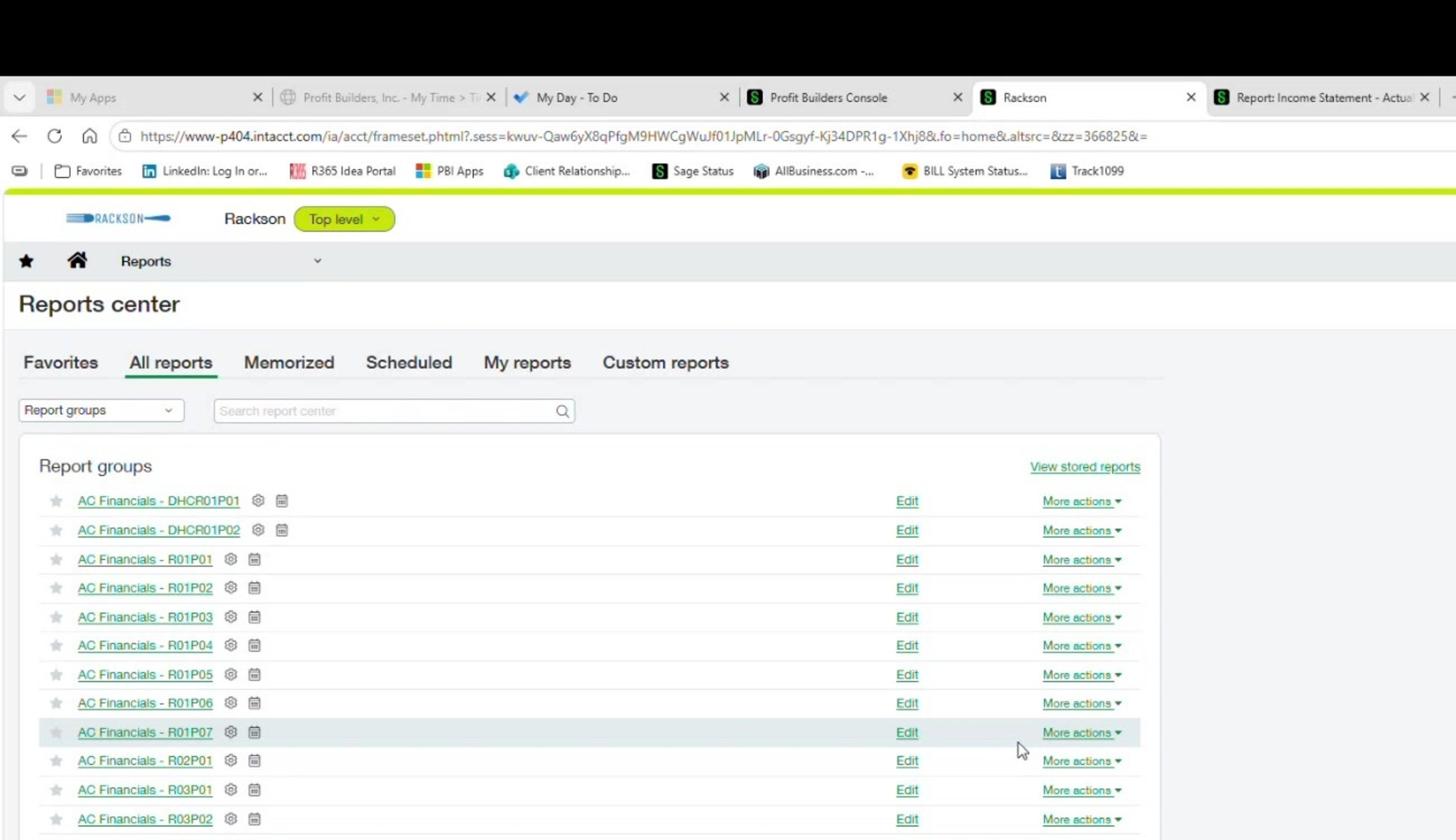
Report packages follow an **`AC Financials - [Location Group]`** convention. Confirmed live examples:
| Package | Concept |
|---|---|
| `AC Financials - DHCR01P01` · `AC Financials - DHCR01P02` | Dave's Hot Chicken, Region 01, Pods 01/02 |
| `AC Financials - R01P01` through at least `R01P07` | RRS regions/pods |
| `AC Financials - R02P01` · `R03P01` · `R03P02` | RRS regions/pods |
To find or edit a specific pod's distribution package, search Reports Center for **"AC Financials"** and then the pod code.
## Where scheduling lives
**Reports → Reports Center → All Reports.**
This is where the recipient list, format, delivery method, and cadence are all configured for a given package.
### What's configured on each schedule
Each schedule is hard-coded to:
- A specific **location group**
- A **start date** (originally set when the package was first configured)
- A **delivery format**
- A **delivery method** (email)
- A list of **recipient email addresses**, separated by commas
 ## Ownership has shifted to PBI
Historically, **Mike (client-side) maintained this distribution list himself.** His access was later restricted to view-only as part of unrelated access changes tied to bill-approval permissions, so **ownership of updating these schedules has effectively moved to PBI.**
When Mike or an area coach needs a change — adding/removing a recipient, changing report groups for someone — **the request should now come to PBI to execute.** Do not assume the client can still self-serve this.
## The critical trap — always move the start date forward
**When you make any change to a schedule, update the Start Date field to the next period's end date** — the date the change should become effective — **before saving.** Do not leave the original, older start date in place.
**If the start date is left far in the past when you save a change, Sage Intacct has been known to go back and attempt to re-send/re-run report deliveries for historical periods.** That is not what you want.
Simply closing a journal ledger does **not** appear to force a re-send on its own. It is **changing the schedule itself while an old start date is still in the field** that carries the risk.
## CC yourself
On every schedule, the **"CC me" option should stay checked** so PBI receives a copy of every email that goes out. This is also how the team spot-confirms that the expected volume of report emails — **roughly 180 per period** across all packages — actually went out.
## The "Group by location or entity" setting
This checkbox controls how a multi-report, multi-location package is **ordered in the delivered file**:
| Setting | Ordering |
|---|---|
| **Unchecked** | Groups by **report type** first — every location's copy of Report A, then every location's copy of Report B, and so on. |
| **Checked** | Groups by **location** first — all of one location's reports together, then the next location's reports. |
Which is preferable **depends on who's receiving the package** — there isn't a single right answer. But Excel deliveries checked this way tend to **order tabs by location**, which is generally the more useful arrangement for a store-level recipient.
## Related
- [Report distribution matrix](/internal/customers/rackson/reference/report-distribution-matrix) — the full recipient and package listing (182 emails, 138 recipients)
- [Intacct reporting infrastructure](/internal/customers/rackson/review-process/intacct-reporting) — how the reports themselves are built
- [Running and delivering prelim reports](/internal/customers/rackson/processes/running-prelim-reports) — the manual prelim delivery process, separate from these scheduled packages
## Ownership has shifted to PBI
Historically, **Mike (client-side) maintained this distribution list himself.** His access was later restricted to view-only as part of unrelated access changes tied to bill-approval permissions, so **ownership of updating these schedules has effectively moved to PBI.**
When Mike or an area coach needs a change — adding/removing a recipient, changing report groups for someone — **the request should now come to PBI to execute.** Do not assume the client can still self-serve this.
## The critical trap — always move the start date forward
**When you make any change to a schedule, update the Start Date field to the next period's end date** — the date the change should become effective — **before saving.** Do not leave the original, older start date in place.
**If the start date is left far in the past when you save a change, Sage Intacct has been known to go back and attempt to re-send/re-run report deliveries for historical periods.** That is not what you want.
Simply closing a journal ledger does **not** appear to force a re-send on its own. It is **changing the schedule itself while an old start date is still in the field** that carries the risk.
## CC yourself
On every schedule, the **"CC me" option should stay checked** so PBI receives a copy of every email that goes out. This is also how the team spot-confirms that the expected volume of report emails — **roughly 180 per period** across all packages — actually went out.
## The "Group by location or entity" setting
This checkbox controls how a multi-report, multi-location package is **ordered in the delivered file**:
| Setting | Ordering |
|---|---|
| **Unchecked** | Groups by **report type** first — every location's copy of Report A, then every location's copy of Report B, and so on. |
| **Checked** | Groups by **location** first — all of one location's reports together, then the next location's reports. |
Which is preferable **depends on who's receiving the package** — there isn't a single right answer. But Excel deliveries checked this way tend to **order tabs by location**, which is generally the more useful arrangement for a store-level recipient.
## Related
- [Report distribution matrix](/internal/customers/rackson/reference/report-distribution-matrix) — the full recipient and package listing (182 emails, 138 recipients)
- [Intacct reporting infrastructure](/internal/customers/rackson/review-process/intacct-reporting) — how the reports themselves are built
- [Running and delivering prelim reports](/internal/customers/rackson/processes/running-prelim-reports) — the manual prelim delivery process, separate from these scheduled packages